YOUTUBE SUBTITLES
YouTube dual subtitles, original and translation together
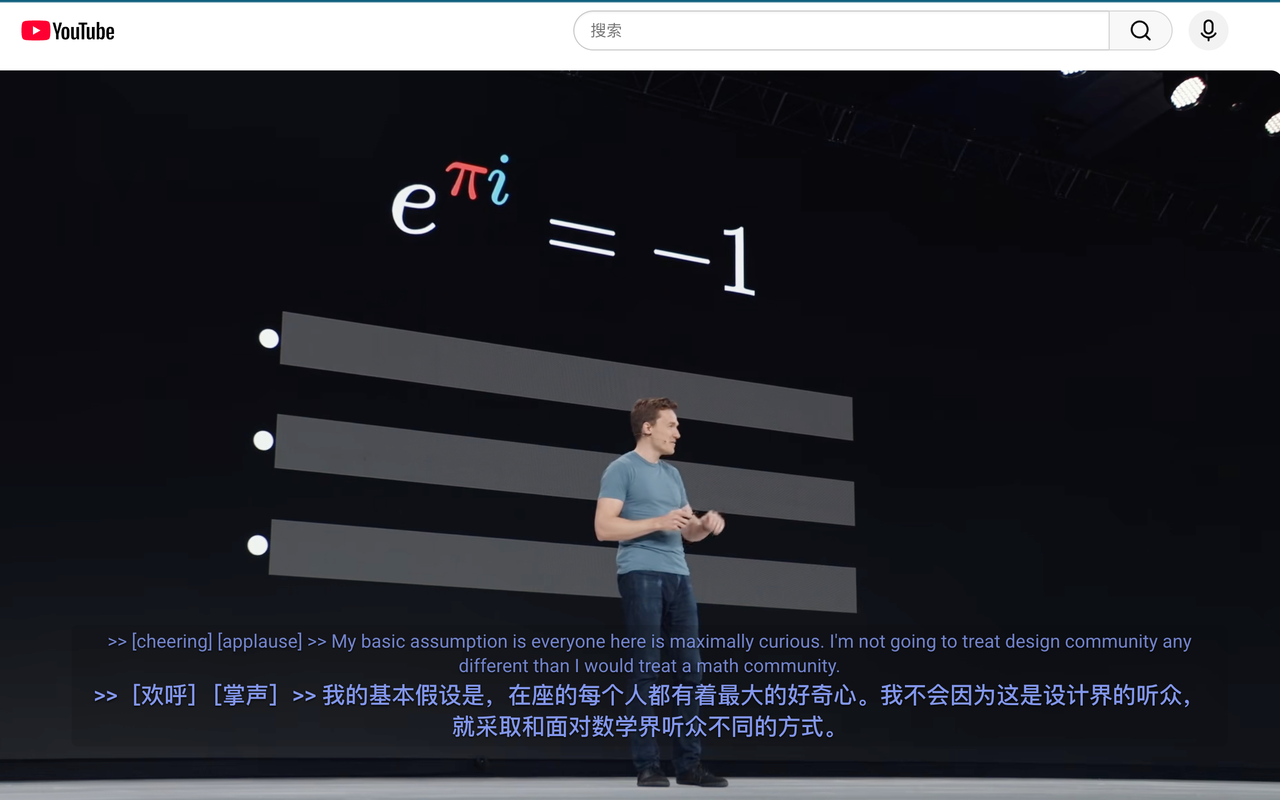
Blab Translation is a free subtitle translator for Chrome that translates YouTube subtitles as they appear and shows them in two lines: the original on top, your language below. You keep hearing the speaker's words while reading them in a language you know, which makes it easier to follow a lecture, a talk or an interview, and to learn from it.
What it does
Two lines, live
Every caption is translated the moment it appears. The original stays on the first line and the translation sits right under it, so you can glance between them without pausing the video. Because the original stays on screen, you can hear a phrase, read it as it was said and check what it means in one glance, which helps when you are learning the language.
A switch in the player
A button in the player's own control bar turns the translation off for the video you are watching, or back on, so you never have to leave the video to change it. It changes no setting; the next video is translated again.
Captions where you want them
Drag the caption box anywhere on the video, resize it, and change how it looks, so the subtitles fit the picture rather than cover it: move them to the top of the frame, for example, when a video already has words burned into the bottom.
Beyond YouTube
It works with HTML video players that offer a standard subtitle track, so the same dual subtitles appear on other sites that publish captions properly. It uses the same engines as web page translation: Chrome's on-device translator, your own AI model, or Blab Translation with a subscription.
How to use it
- 01
Install it
Add Blab Translation from the Chrome Web Store. There is nothing else to switch on: subtitles are translated whenever auto-translate is on, which it is from the start, on every site you have not stopped it on.
- 02
Open a video with captions
If the video's own captions are off, the extension turns them on for you; if you switch them off yourself, it leaves them off. It translates the subtitle track that the video provides.
- 03
Watch in two languages
The translation appears under each line as it plays. The button in the control bar turns it off for this video or back on, and the site's row in the popup stops it on YouTube altogether. Drag the box if it covers something.
Limits and billing
The extension is free. With Chrome's on-device translator, subtitles are translated on your computer; with your own AI engine, the text goes straight to the endpoint you set with your own key and never through our servers. With Blab Translation, included with a subscription, the captions are translated on our servers and we do not keep the original. No analytics, no ad tracking.
It translates the captions a video already has, so a video with no subtitle track has nothing to translate. PDFs and comics you send to the web app are processed on our servers too, and deleted after 7 days.
Questions
Does it work when a video has no subtitles?
No. It translates the subtitle track the video already has, and turns the video's own captions on when they are off. If a video has no track at all, there is nothing to translate.
Can I move or resize the subtitles?
Yes. Drag the caption box to any position, resize it, and restyle it so it reads well over the picture.
Does it work on sites other than YouTube?
Yes, on players that use HTML video with a standard subtitle track. That track is what the extension reads and translates.
Can I use dual subtitles to learn a language?
Yes, that is what the two lines are for. The original stays on screen with the translation under it, so you hear a phrase, read it as it was said and see what it means at the same moment. When you want to follow the original alone, turn the translation off for that video with the button in the player.
Which engine translates the captions, and what does it cost?
The same one you use for web pages. Out of the box that is Chrome's on-device translator, which is free, as is the extension. In Settings you can choose Blab Translation, included with a subscription, or add your own key for an OpenAI-compatible endpoint, Anthropic Claude, Gemini, DeepSeek or OpenRouter, which that provider bills, or point it at a local model in Ollama or LM Studio.